

No. AI will not replace the CRM, but it is changing the screen you work in. A headless CRM keeps the data, the rules and the permissions in one system, and people and AI agents work with it from an AI chat, Slack, email or a phone instead of the CRM’s own pages. Salesforce put a name on this idea when it announced Headless 360 on April 15, 2026.
In a recorded conversation in October 2026, Vladislav German, founder of Deeps Solutions, asked Robin Dijst whether a company will one day need no HubSpot or Salesforce, only one AI agent that stores everything. Robin is a HubSpot freelancer from the Netherlands who worked for years as a Salesforce admin and developer before he moved to HubSpot. His answer had two parts.
No, I don’t think AI will ever kill the CRM. I think AI will kill the CRM as the place you work.
Robin Dijst, HubSpot freelancer, Pack of Nodes
The database stays. What changes is where your team works.
Key takeaways
- A headless CRM separates the data and rules from the screens people use, so AI assistants, Slack and phones work with the same records.
- Salesforce announced Headless 360 on April 15, 2026. In September 2026 it dropped the name and launched AIforce on the same idea.
- HubSpot connects its CRM to Claude, ChatGPT and other AI tools through its MCP server, within each user’s permissions.
- AI does not replace the CRM, because AI needs structured data that lives and changes in one place.
- The work to do now: clean data, a written sales process and clear access rules.
What is a headless CRM?
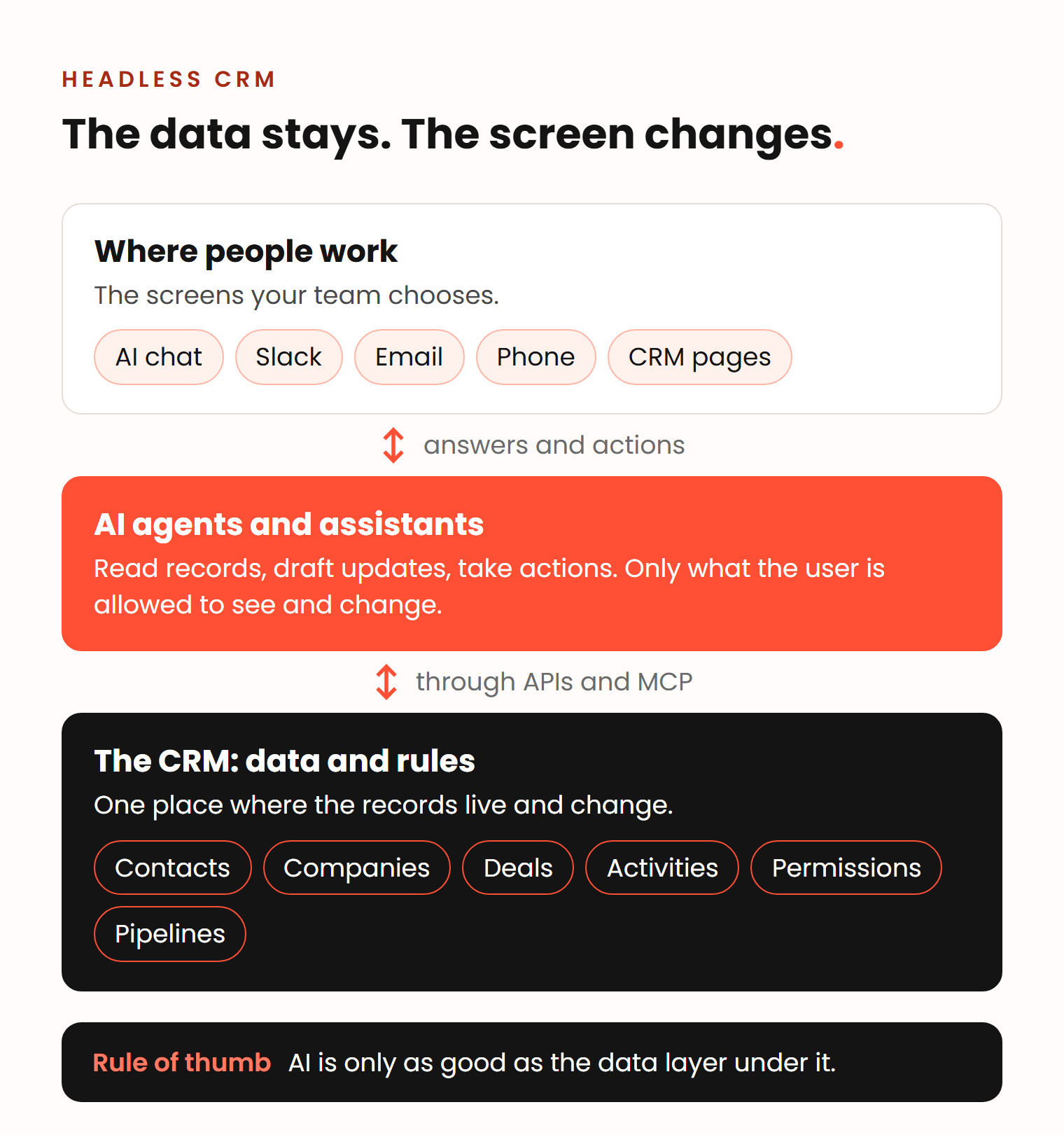
A headless CRM is a CRM you can use without opening its screens. The data, the objects, the workflows and the permissions stay in the CRM. People and AI agents reach them through other tools: an AI assistant, Slack, email, a phone app or your own software.
The word comes from websites. A classic content management system (CMS) stores your pages and also shows them. A headless CMS only stores the content. The website, the mobile app and the screen in the shop each fetch it through an API and show it their own way. The “head” is the front end. Take it off, and the same content can go anywhere.
A headless CRM applies the same split to sales data:
- The body is the database: contacts, companies, deals, activities, and the rules about who can see and change them.
- The head is everything you look at: record pages, pipeline boards, dashboards and the forms reps fill in.
- The connection is an API, and more and more often an MCP server. MCP (Model Context Protocol) is an open standard that lets AI tools such as Claude or ChatGPT connect to outside systems, read their data and take actions.
For a sales leader, this means a rep can ask an AI assistant which deals have no next meeting booked and tell it to create the follow-up tasks, without opening the deal board. The CRM still holds the records, checks the permissions and keeps the history.
How does Salesforce Headless 360 work?
Salesforce Headless 360 opens the Salesforce platform to AI agents and other tools, so the work does not need the Salesforce browser screen. Salesforce announced it on April 15, 2026 as the main news of its TDX developer conference, with the line “Everything on Salesforce is now an API, MCP tool, or CLI command, and agents can use all of it.”
In the same announcement, Salesforce listed more than 60 new MCP tools, more than 30 ready-made skills for coding agents, and an “experience layer” that shows Salesforce components inside Slack, ChatGPT, Claude, Gemini, Microsoft Teams and mobile apps. In August 2026 it added a Headless 360 MCP server in open beta and let employees update opportunities and start workflows from Slack, with the same permissions they have in Salesforce.
The name has already changed. On September 14, 2026, The Next Web reported that Salesforce had dropped the Headless 360 name. A day later, at Dreamforce, Salesforce presented AIforce, a “live interface layer” built on what it now calls the Headless Toolkit. It launched with Salesforce inside Claude (in beta) and inside Slack. Salesforce says each agent sees only what the person asking can see.
The direction is clear: Salesforce wants its data and rules used wherever people already work. If you are comparing the two platforms, see our HubSpot vs Salesforce guide.
What does HubSpot offer in the same direction?
HubSpot does not use the word headless, but as of November 2026 it offers the same idea: AI tools outside HubSpot can read and change your HubSpot data.
| When | What HubSpot released | What it means for a sales team |
|---|---|---|
| June 2025 | Deep research connector for ChatGPT | ChatGPT can research and analyze your HubSpot data, within each user’s permissions. |
| July 2025 | Connector for Claude | The same for Claude. As of November 2026 it can also create and update records, on web, desktop and mobile. |
| April 13, 2026 | Remote MCP server, generally available | Any AI tool that supports MCP can read and update contacts, companies, deals, tickets and activities. |
| September 15, 2026 | MCP server reaches the settings | AI tools can create properties and set up pipelines and stages. Every write shows in the audit log. |
HubSpot says more than 7,900 agents now connect to HubSpot through its MCP server. The access rule matches Salesforce: users can only reach or change records they already have permission to view or edit.
At the same time, HubSpot puts more AI into its own screens. The new Breeze Assistant takes a goal in plain language and hands the work to specialized agents. In July 2026, Benjamin Wallmann, partner at Deeps Solutions, described HubSpot’s direction as becoming “the everything app for sales”, with meeting transcripts, screen recordings, video editing and code that runs inside HubSpot apps.
So HubSpot moves in two directions at once: more work inside its own screens, and more ways to work from outside them. Both lead to the same rule: the data in HubSpot has to be good. We describe the built-in features on our page about making HubSpot smarter with AI.
Will AI replace the CRM?
No. AI needs a place where structured data lives, is checked and is changed, and for sales teams that place is the CRM. What AI replaces is a large part of the clicking, typing and searching that reps do on CRM screens. Robin explains why.
At the end of the day, an AI is still reading data, and data needs to be structured. The better the structure, the better the output, the better the context.
Robin Dijst, HubSpot freelancer, Pack of Nodes
That data has to live somewhere and be changed somewhere, and Robin expects the CRM to stay that place for commercial teams. What changes is how we look at it. Today we see the CRM as a nice screen over a database. In his picture, the database stays and a chat interface tells you what to do: a dashboard for the day and the actions to take. He sees a small version of this in HubSpot’s sales workspace already.
Vlad made the same point in July 2026, when he and Ben talked about how complex HubSpot’s screens are getting.
For Claude, the interface doesn’t matter. It just talks directly with your database. So in a few years, the interface will not matter anymore.
Vladislav German, founder of Deeps Solutions
In his example, you tell the agent to update a project that is linked to a deal and a contact, and the agent fills the gaps or asks you questions. How complex the screen is stops being the limit.
This is also the answer to “is CRM dead?” The CRM as the system that holds the truth about your customers is not. The CRM as the place where reps spend their day is getting smaller.
What is the future of CRM for a sales team?
The future of CRM is less typing into records and more checking what AI has prepared. Three things change first.
Admin work moves to AI. Robin lists note takers that log calls, a research agent that prepares a complex meeting, and email drafts. In his words, “all the administrative tasks, they vanish.” What is left for the rep is to read the drafts and the report, form an opinion and make changes where needed.
Updates come from where the rep already is. A rep logs a call from a phone, updates a deal from a Slack thread or asks an AI chat for the week’s open tasks. Salesforce builds for Slack and Claude, HubSpot for Claude and ChatGPT.
The CRM’s own pages stay, for fewer people. Admins still build the data model there, and managers check the pipeline. Reps who spend the day in calls open them less often.
The risk changes too. When AI writes into the CRM, a bad rule or a messy field spreads faster.
What should a sales team do now?
Fix the three things AI depends on: clean data, a clear process and clear access rules. None of them is new. They decide whether an AI CRM gives your team useful answers or confident wrong ones.
1. Clean, structured data. AI reads what is in the record and nothing else.
- Keep one record per company and per contact. Merge duplicates.
- Use dropdowns instead of free text for the fields you report on, such as industry, lead source and lost reason.
- Link every deal to its company and contacts. AI follows these links to answer “who is involved in this deal?”
- Make the key fields required at the stage changes where they matter.
HubSpot’s new Context Home even scores how complete the context behind its AI is and shows the gaps. If the gaps are large, start with a data cleanup.
2. A written sales process. An agent cannot follow a rule that lives only in a manager’s head. Define your pipeline stages with exit criteria: what must be true before a deal moves on. Agree what goes into the record after each call. Our guide on how to build a sales process shows how.
3. Clear access rules. AI connectors at both HubSpot and Salesforce follow the permissions of the user who connects them. That makes your permission setup your AI access setup. If every rep is a super admin, so is every rep’s AI assistant.
- Give each role only the access it needs.
- Decide which AI tools the company allows, and connect them with company accounts. Claude Enterprise admins, for example, can limit the HubSpot connector to company accounts.
- Mark sensitive data, and know what that switches off. In HubSpot, turning on sensitive data blocks calls, emails, meetings, notes and tasks from the MCP server.
- Check the audit log after AI tools make changes, at least in the first weeks.
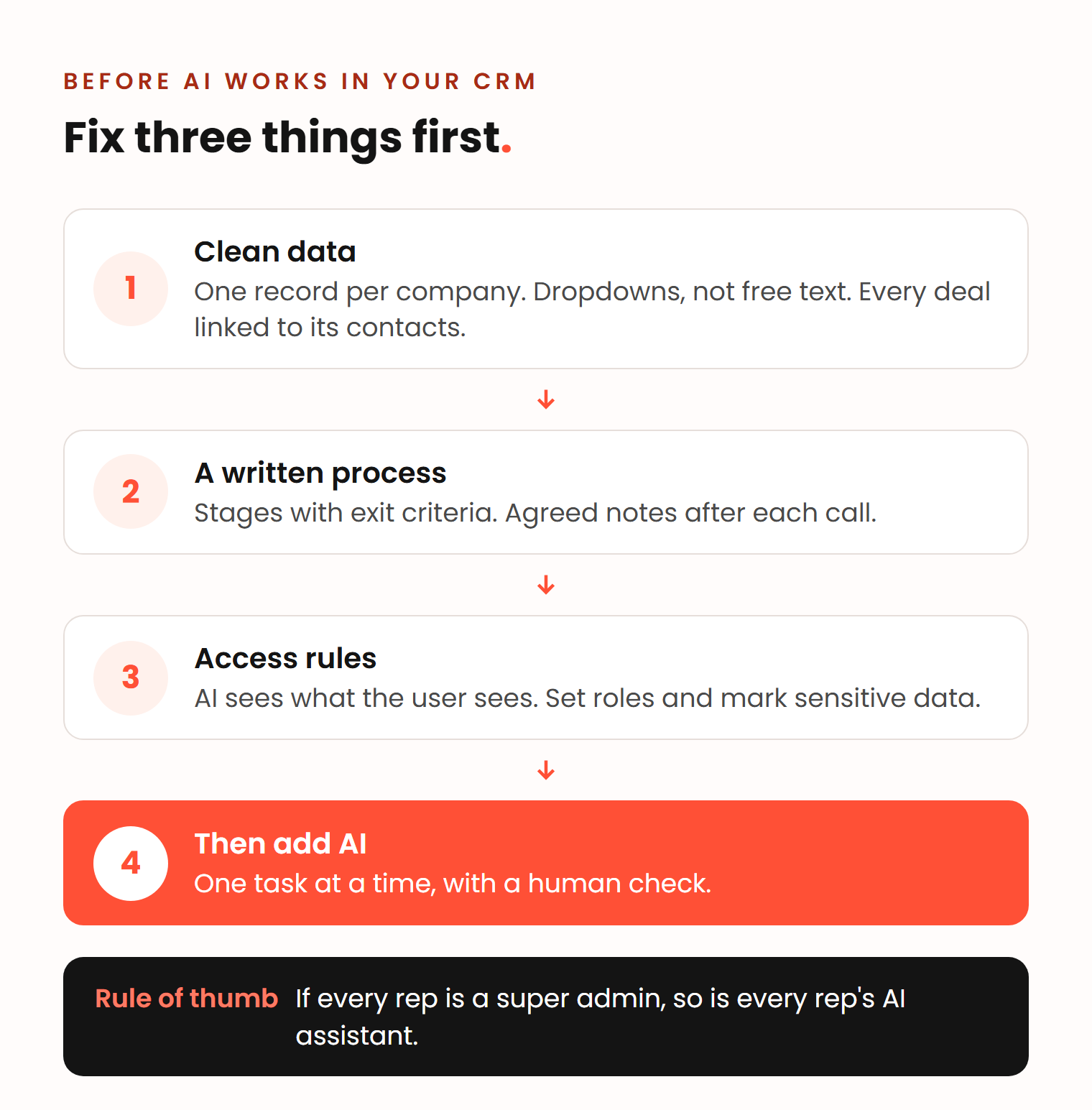
Then start small. Pick one repeated task, such as call notes into the CRM or the Monday pipeline review, run it through an AI tool for a month and check the output. Our guide on how to use AI in sales has workflows that sales teams use today.
How we approach this at Deeps
We are a HubSpot Gold partner and work with B2B companies of 50 to 500 employees on HubSpot Professional or Enterprise. Every project starts with an analysis of how your team sells. To prepare a portal for AI, that usually means a HubSpot audit (from €1,000, 1 to 2 weeks), then data cleanup (from €1,000) and the AI setup itself. You get a quote after an intro call.
Frequently asked questions
What are headless apps?
Headless apps keep the data and the business logic in one back end and leave the screen to other tools. A website, a mobile app or an AI assistant gets the data through an API and shows it in its own way. Headless CMS for websites made the idea common. A headless CRM applies it to sales data.
How does Salesforce headless work?
Salesforce opens its data, workflows and permissions as APIs, MCP tools and command-line commands, so AI agents and other apps can use them without the Salesforce browser screen. It announced this as Headless 360 in April 2026. As of November 2026 it offers it through AIforce, with Salesforce working inside Claude and Slack.
Is the CRM dead?
No. AI agents still need structured data that lives and changes in one place, and for sales teams that place is the CRM. What is shrinking is the time reps spend on CRM screens, because AI tools can read and update records from a chat, Slack or a phone.
Will AI replace salespeople?
Not the part of the job that needs thinking. AI takes over admin work such as call notes, research and email drafts. Vlad’s rule is that the human part sits where you have to think and make decisions, and Ben adds that people still buy from people.