

A CRM implementation plan has 7 steps: map the sales process, design the setup, prepare the data, build and test, train each role, go live, and support the team through hypercare. For a sales team of 10 to 50 people, the whole plan takes about 5 to 8 weeks. It works when the people who will use the CRM help shape it from the first week, so in this plan the people side is part of every step.
Key takeaways
- Map the sales process before anyone opens the CRM, because a setup built on an unclear process has to be rebuilt.
- Most of our mid-market implementations take 5 to 8 weeks: 3 to 4 weeks of setup, then 2 to 4 weeks of hypercare.
- Build the main cases first and add detail once the team uses the system every day.
- Involve the reps early, and stay firm on the process but flexible on the details.
- Train each role on its own daily work, and name one super user who supports the team after launch.
Why do CRM implementations fail?
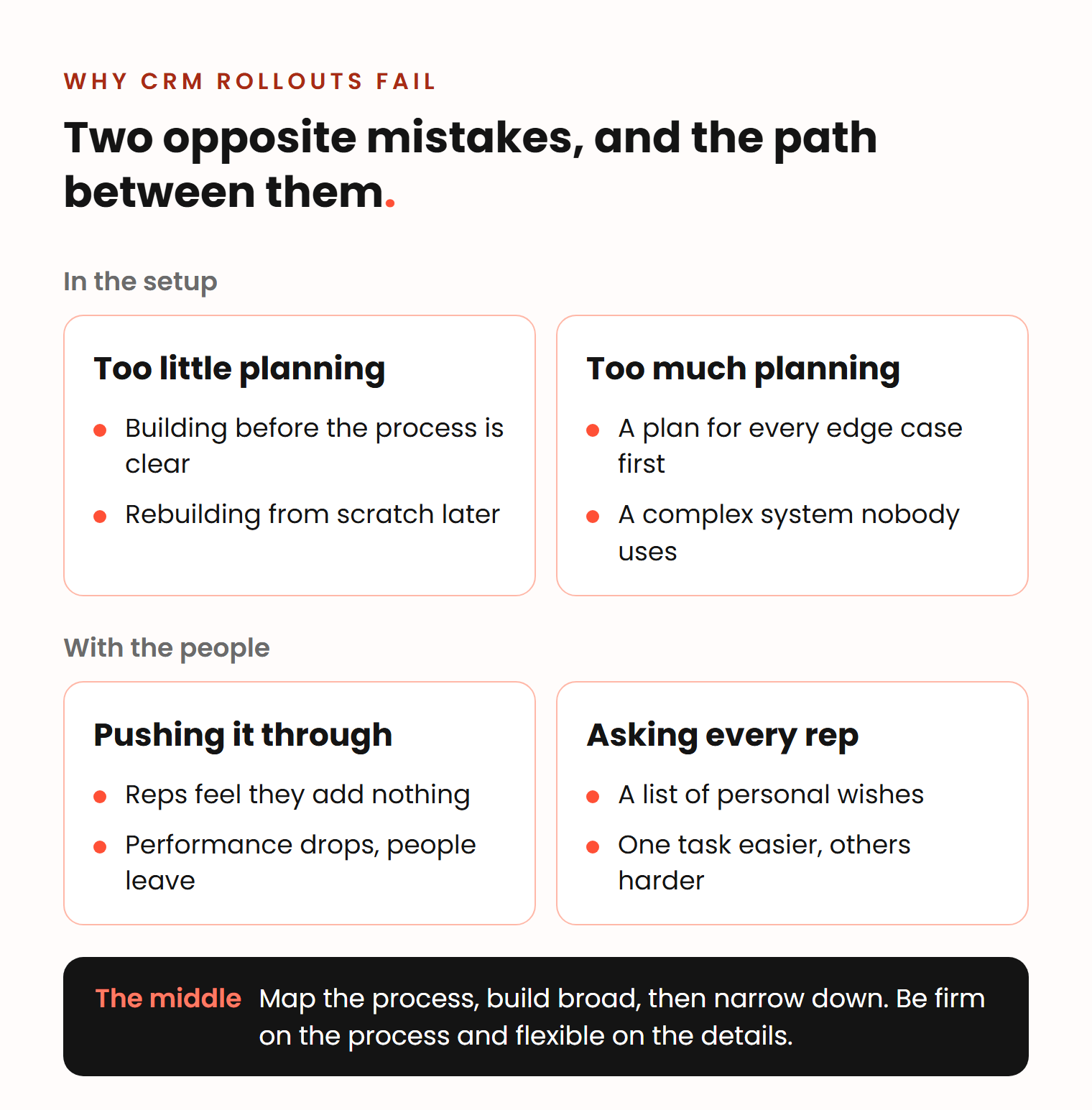
Most CRM implementations fail in one of two opposite ways: the team builds before it plans, or it plans so much that the system is too complex to use. When we talked about rolling out sales tools, Vladislav German, founder of Deeps Solutions, described the first one:
The biggest mistake would be to start building without planning. If you start to implement a CRM right away, without first analyzing your sales process and making sure your whole sales team is aligned on it, you will fail, certainly. You will waste a lot of time, and then you will still have to take a step back, do the planning and implement everything from scratch.
Vladislav German, founder of Deeps Solutions
The second mistake is the other extreme: planning for every case before anyone uses the system. The result is a complex system that nobody uses, and every small change touches everything else. Benjamin Wallmann, partner at Deeps Solutions, suggests the path between them: build broad first, then narrow down to the edge cases that need automation.
The people side has the same two extremes. Push the change through without asking anyone, and reps feel they have nothing to add. Ben warns that their performance then suffers and some leave sooner than the company would like. Ask every rep how they want the CRM to look, and you get a list of wishes that make one task easier and others harder.
In Prosci’s change management research, a survey of more than 2,600 change practitioners, 88% of projects with excellent change management met or exceeded their objectives. With poor change management, only 13% did. The figures are self-reported, but the gap is large: Prosci puts it at about seven times.
Before week 1: agree on the scope
A smooth project starts before the first workshop, with a written scope. Vlad’s list for that document: the integrations you need, where your data is stored today and in what condition, and the automations you expect.
Write down what is out of scope as well, so new wishes go into a later phase and not into the deadline. Our guide on how to prevent scope creep shows how. Then name three people: a project owner who can make decisions (usually the Head of RevOps or Sales Operations), a super user who will support the team after launch, and a sales leader who signs off on stages and reports.
The 7-step CRM implementation plan at a glance
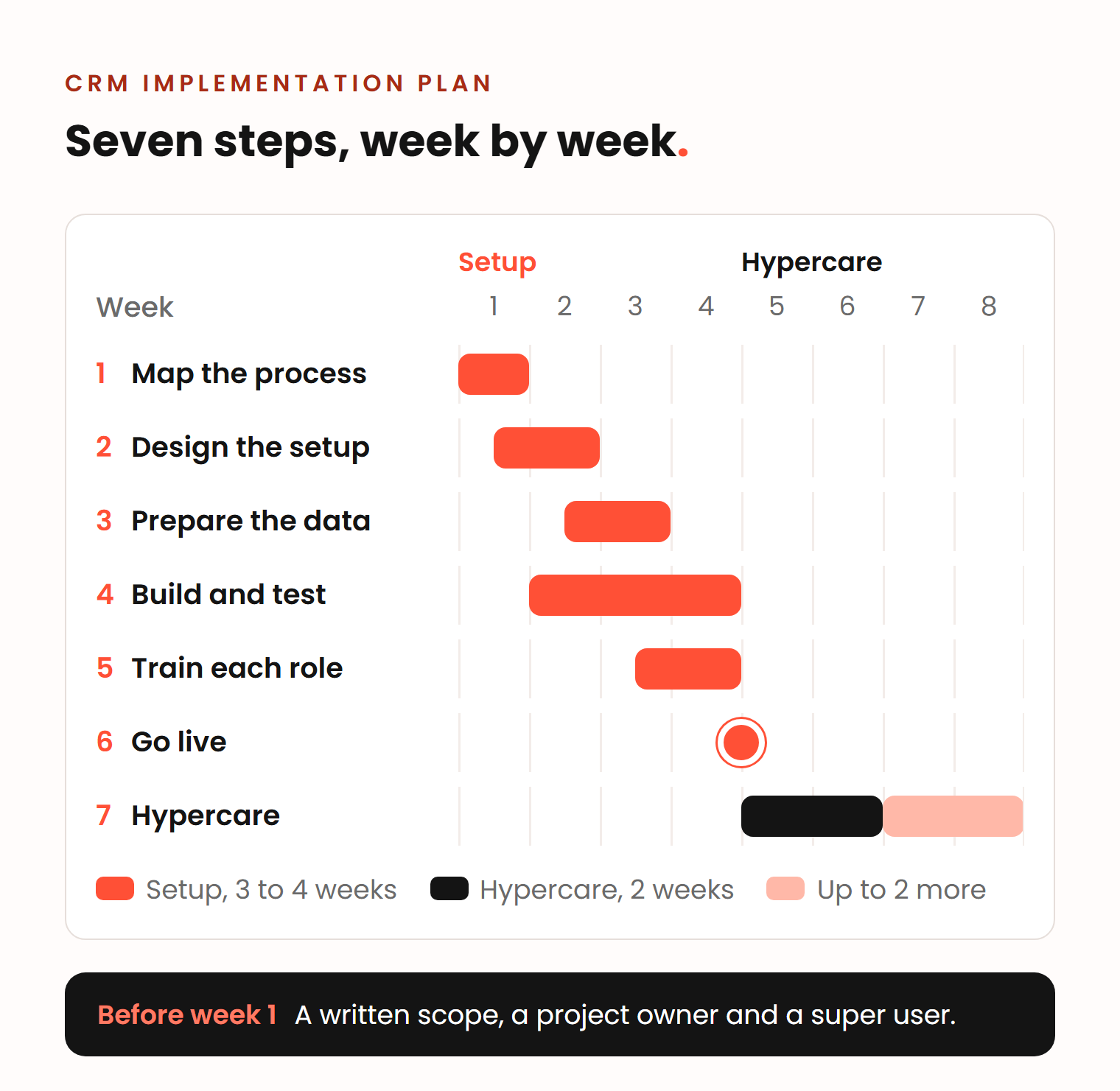
The 7 steps overlap, and for a typical mid-market team the first 6 fit into 3 to 4 weeks. Hypercare then takes another 2 to 4 weeks.
| Step | When | Who leads | Who takes part |
|---|---|---|---|
| 1. Map the process and set goals | Week 1 | Project owner | Sales leader, 1 or 2 reps, marketing |
| 2. Design the setup | Weeks 1 to 2 | CRM admin or partner | Sales leader signs off |
| 3. Prepare the data | Weeks 2 to 3 | CRM admin or partner | IT exports, super user checks |
| 4. Build and test | Weeks 2 to 4 | CRM admin or partner | Super user and 1 or 2 reps test |
| 5. Train each role | Weeks 3 to 4 | Partner or super user | All users, 60 to 90 minutes per session |
| 6. Go live | End of week 3 or 4 | Sales leader | The whole team |
| 7. Hypercare | 2 to 4 weeks after go-live | Partner and super user | Reps and managers give feedback |
The hours each role needs are in our answer on how involved your team needs to be.
CRM implementation steps, one by one
Each step says what to do, who does it, and how to bring the sales team along.
Step 1: Map the sales process and set goals (week 1)
Define how you sell before you think about the tool. Vlad’s rule is to keep the two discussions apart, because talking about CRM stages too early pulls the team away from the real process. Through which channels do leads arrive? What happens right after a lead comes in? Talk it through with the sales team and mark the gray areas, the places where people do it differently. Ben maps it on a digital whiteboard, where the team can move steps around.
Many companies have a sales process but have never written it down as stages. This workshop does that. Also agree on 2 or 3 goals the CRM must reach. Vlad’s example: start to see the data, keep customer data in one place instead of in the reps’ heads, and understand which marketing works.
People side: invite 1 or 2 reps, not only the manager. They know where the process breaks, and a team that sees its own process on the board is more likely to accept the CRM built on it.
Step 2: Design the setup (weeks 1 to 2)
Turn the process into pipelines, stages with clear exit criteria, properties, and the reports leadership needs.
Design for the next few years, but build only what the team needs now. Richie Dharma, head of HubSpot at Red Pandas Digital, gives this advice to other CRM consultants:
Spend even more time with the client to map out two to three years ahead.
Richie Dharma, head of HubSpot at Red Pandas Digital
He suggests showing the client a two-year map with the later parts grayed out, to switch on when the business needs them.
People side: design the stage rules around what the reps want. Ben’s example is a rep who wants to reach the contract stage: “For him, it’s a win if I send the contract.” If that stage asks for the details the contract needs, reps fill them in, because they want to get there. Use dropdowns and preset values instead of free text, so nobody can type in random entries.
Step 3: Prepare the data (weeks 2 to 3)
Find every place where customer data lives today: spreadsheets, inboxes, an old CRM, phones. Decide what moves and what stays behind. Remove duplicates, map the old fields to the new properties, run a test import, check it, and only then import everything.
People side: let reps check a sample of their own accounts in the test import. If a rep opens the CRM on day one and finds their customers wrong, trust is hard to win back.
Step 4: Build and test (weeks 2 to 4)
Configure the pipelines, properties, automations and dashboards. Connect email, calendar and the other tools from the scope, so reps do not log their work by hand.
In HubSpot, you can mark a property as required for a pipeline stage. Users who move a record into that stage, or create one in it, must fill in the property first (as of November 2026).
Email templates and sequences belong in the build too. Many teams have nothing standard yet, and every rep just types. Let the team write the copy in its own voice, and give them the framework: after two days with no reply, what do you send?
People side: test with real cases. Ask the super user and 1 or 2 reps to run last week’s deals through the new setup. They find the gaps that a demo hides.
Step 5: Train each role (weeks 3 to 4)
Train each role on its own daily work, in sessions of 60 to 90 minutes. Reps learn today’s tasks, logging a call and moving a deal. Managers learn pipeline reviews and dashboards. The super user gets deeper training and becomes the first person the team asks.
Ben’s view is that if a salesperson finds the CRM too complicated, the setup is too complicated. Where to click is a matter of training: some people get it at once, others need a couple of hours. People who use the CRM only now and then forget it between uses, so give them short written guides or videos for single tasks. Our Team Enablement & Training service works this way.
People side: show each role what the CRM does for them. In Ben’s experience, about 9 in 10 of the changes make the salesperson’s day easier: fewer forms, tasks instead of memory, meetings booked through a link.
Step 6: Go live (end of week 3 or 4)
Pick a date, import the final data, and make the old spreadsheet read-only. From that day, the sales leader runs pipeline meetings from the CRM dashboards. If reviews still happen on a spreadsheet, reps will keep the spreadsheet updated, not the CRM. Our answer on why a sales team does not use HubSpot lists the other common causes.
People side: the go-live should not surprise anyone. Ben warns against announcing the new way of working in a meeting as a finished fact. Reps who saw the changes in steps 1 to 5 have had time to get used to them.
Step 7: Support the team in hypercare (2 to 4 weeks after go-live)
Stay with the team after go-live, because many needs only show once people use the system every day. Watch who logs activities, which deals have no next step, and which deals stay too long in one stage. Collect feedback every week, fix what is broken, and adjust workflows and reports.
People side: some reps will ask for changes. Make the ones that do not break the process. Ben’s rule for this phase:
Be firm in your process that you have defined, because there’s a reason you defined it that way. But then give a little leeway to the salesperson so they feel good about it.
Benjamin Wallmann, partner at Deeps Solutions
For what happens in each phase, see how long a HubSpot implementation takes.
How Deeps runs a CRM implementation
Every Deeps project starts with an analysis of how the team sells, before anything is built in HubSpot. We hold workshops with the client every week, we talk to the reps as well as the manager, and we train each role and one super user.
For Dominius AS, a Norwegian door company that ran its sales from shared spreadsheets and inboxes, we first mapped how the team sells, quotes and orders. Then we moved the data, built the setup, and trained the whole sales team with a one-page guide and short videos for single tasks. A weekly call with the sales team still reviews the pipeline and fixes what slows them down.
HubSpot Implementation starts from €5,000 and usually takes 5 to 8 weeks. You get a quote after an intro call.
Frequently asked questions
What is the first step in a CRM implementation?
The first step is to map your sales process without thinking about the tool. Write down where leads come from, what happens to each lead, and who does what at each stage. Then agree on 2 or 3 goals the CRM must reach. Only after that, design the setup.
What are the 5 steps of the implementation process?
A common five-step version is plan, design, build, train and launch. This plan uses 7 steps, because data preparation and the weeks after go-live each need their own owner and their own time. Both are easy to underestimate when they hide inside “build” and “launch”.
What is a CRM strategy?
A CRM strategy says why you use a CRM and what it must achieve: which customers you serve, how you sell to them, and which goals the system supports. The CRM implementation plan is the how and the when: the steps, owners and dates that put the strategy into the system. Write the strategy first, in a few lines, then the plan.
How long does a CRM implementation take?
In our projects, a mid-market sales team with a defined process needs about 5 to 8 weeks: 3 to 4 weeks of setup and 2 to 4 weeks of hypercare. Several teams, custom integrations or messy data add time. A company that is still working out how it sells needs an ongoing project instead, because the CRM has to change each time the process changes.