

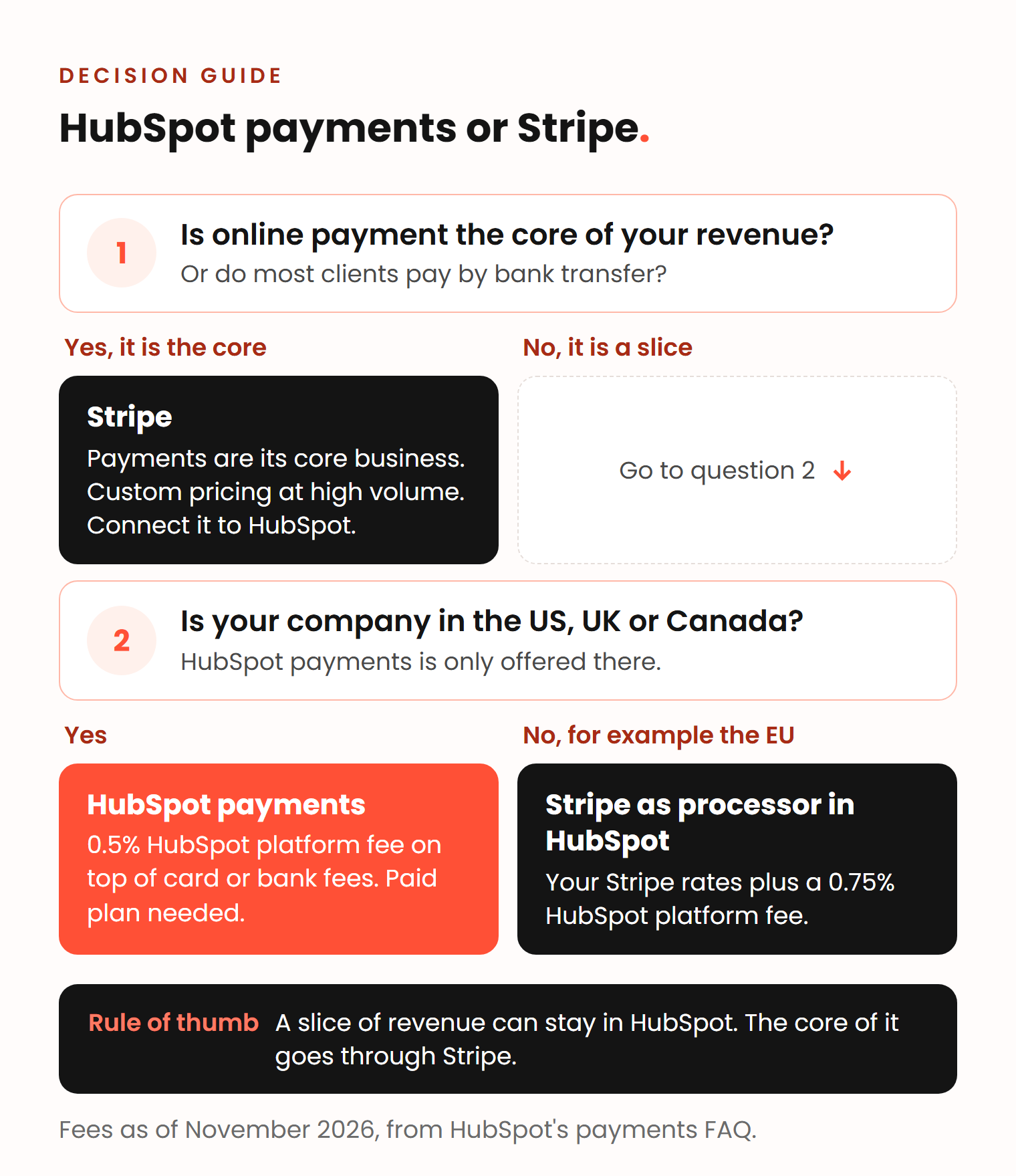
HubSpot payments vs Stripe comes down to one question: is online payment a slice of your revenue or the core of it? If most clients pay by bank transfer and only some pay by card, HubSpot payments is the simpler choice, as long as your company is in the US, the UK or Canada. If online payments are the core of the business, or your company is based elsewhere, use Stripe and connect it to HubSpot, where HubSpot adds a 0.75% platform fee to Stripe’s own rates (as of November 2026).
Vladislav German and Benjamin Wallmann of Deeps Solutions discussed this in a recorded conversation. Below are Vlad’s rule, Ben’s two ways to connect Stripe plus a third, and the fees, countries and plans as HubSpot and Stripe publish them.
Key takeaways
- HubSpot payments is only for companies based in the US, the UK and Canada. Companies in the EU use Stripe as the processor inside HubSpot.
- HubSpot’s platform fee is 0.5% with HubSpot payments and 0.75% with Stripe, on top of the card or bank fee (November 2026).
- With Stripe as the processor, the 0.75% has no cap on bank debits: a $50,000 ACH payment costs $380 in fees, against $20 with HubSpot payments.
- The free Stripe app syncs Stripe data into HubSpot but gives you no HubSpot payment links, quotes or invoices.
What is the difference between HubSpot payments and Stripe?
HubSpot payments is HubSpot’s own payment processing, built into the CRM. Stripe provides the infrastructure underneath, but HubSpot is your payment provider: it reviews your business, takes the fees and pays out your money (HubSpot payments FAQ). Stripe is a payment company you contract with directly, used on its own or connected to HubSpot.
Inside HubSpot, payment links, invoices, quotes and subscriptions can collect money through either one (HubSpot). You can connect only one of them at a time (HubSpot).
The differences are where your company is based, what each payment costs, and who you deal with when something goes wrong.
Is online payment a slice of your revenue or the core of it?
It is a slice if most clients pay by bank transfer and a few pay by card. It is the core if most of the money comes in online, as in a web shop or self-serve subscriptions. Vlad sees it as a decision about cash flow:
I think this is always a strategic decision for the company, to choose their payment processor. Especially if you process a lot of payments online, you might get into a situation where you have issues with cash flow, or your account is blocked, and you cannot withdraw money or process payments.
Vladislav German, founder of Deeps Solutions
His rule:
It would make sense if the online payments you process through HubSpot are just a few. Sometimes you allow customers to pay by card and you use HubSpot payment processing for that, but in most cases you get a bank transfer directly. Then, in my opinion, it’s okay. If online payment processing is a larger part of your business, you would want to go with something more reliable like Stripe.
Vlad
A slice is typical for a B2B company on HubSpot Professional that sends an invoice after each won deal. HubSpot payments covers the few card payments without another tool, and the payment data sits in HubSpot with the rest of the customer record (HubSpot).
When online payments are the core, the processor is a key supplier. Vlad’s reasoning is that payment processing is Stripe’s whole business, while for HubSpot it is one feature among many, and that at higher volume Stripe can give you your own account manager. Stripe offers custom pricing for large volumes (Stripe pricing), and HubSpot says it may too (HubSpot payments FAQ).
Where is HubSpot payments available?
As of November 2026, HubSpot payments is available only to businesses located in the United States (not US territories), the United Kingdom and Canada. You need a bank account in the same country as your company’s registration and a paid HubSpot plan, Starter or higher (HubSpot payments FAQ). Your buyers can be anywhere: HubSpot payments accepts cards in more than 130 currencies (HubSpot), with an extra fee for international cards.
This matters for European companies. A company registered in Germany, Lithuania or Norway cannot use HubSpot payments. It can connect Stripe as the payment processor, which HubSpot supports on every plan, including Free, in most countries where Stripe works. In Europe, the exceptions are Croatia, Gibraltar and Liechtenstein (HubSpot).
HubSpot payments vs Stripe: what does each payment cost?
Each payment carries two fees: a processing fee for the card or bank debit, and HubSpot’s platform fee for its billing tools (HubSpot payments FAQ). HubSpot payments fees are deducted from each payment, not added to your HubSpot bill. There is no monthly fee for invoices, payment links or subscriptions.
Quotes are the exception: new quotes need a Revenue Hub Professional or Enterprise subscription and seat (HubSpot pricing). Sales Hub accounts keep the older legacy quotes, which can also collect payments (HubSpot).
| As of November 2026 | HubSpot payments | Stripe as processor in HubSpot | Stripe alone, with the free Stripe app |
|---|---|---|---|
| Where your company can be based | US, UK, Canada | Most countries Stripe supports | Countries Stripe supports |
| HubSpot plan | Starter or higher | Any, including Free | Enterprise to sync subscriptions |
| HubSpot platform fee | 0.5%, or 0% in the first year for eligible customers | 0.75%, no cap on bank debits | None |
| Card fee | US 2.9%, UK 1.7% for UK cards, Canada 2.9% | Your Stripe rate | Your Stripe rate |
| US bank debit (ACH) | 0.8% plus platform fee, each capped at $10 | Your Stripe rate plus 0.75% | Your Stripe rate |
| HubSpot payment links, invoices, quotes, subscriptions | Yes | Yes | No |
| Who reviews your account and can hold payouts | HubSpot | Stripe | Stripe |
Stripe’s standard rates, as of November 2026: in the US, 2.9% + 30¢ for domestic cards and 0.8% for ACH Direct Debit, capped at $5 (Stripe US pricing). In the UK, 1.5% + 20p for standard UK cards and 2.8% + 20p for premium UK cards (Stripe UK pricing). In Germany, 1.5% + €0.25 for standard EEA cards and €0.35 for SEPA Direct Debit (Stripe Germany pricing).
Here is what that means for three payments, after HubSpot’s first-year offer ends:
- A $5,000 card payment in the US: $170 with HubSpot payments, $182.80 with Stripe as the processor in HubSpot, and $145.30 with Stripe alone.
- A $50,000 ACH payment in the US: $20 with HubSpot payments, because both fees are capped at $10. With Stripe as the processor, it is $5 to Stripe plus $375 to HubSpot, so $380.
- A £5,000 standard UK card payment: £110 with HubSpot payments and £112.70 with Stripe as the processor in HubSpot.
So Vlad’s estimate holds on the published rates: HubSpot payments costs less than Stripe through HubSpot. Stripe alone costs the least per payment, but you lose HubSpot’s billing tools and pay for Stripe’s own instead. Stripe Billing, for example, costs 0.7% of billing volume on its pay-as-you-go plan (Stripe US pricing).
For a company in the EU, only the Stripe route exists inside HubSpot. A €20,000 invoice paid by SEPA Direct Debit costs €0.35 at Stripe’s standard German rate, plus €150 in HubSpot’s platform fee.
How does the HubSpot Stripe integration work?
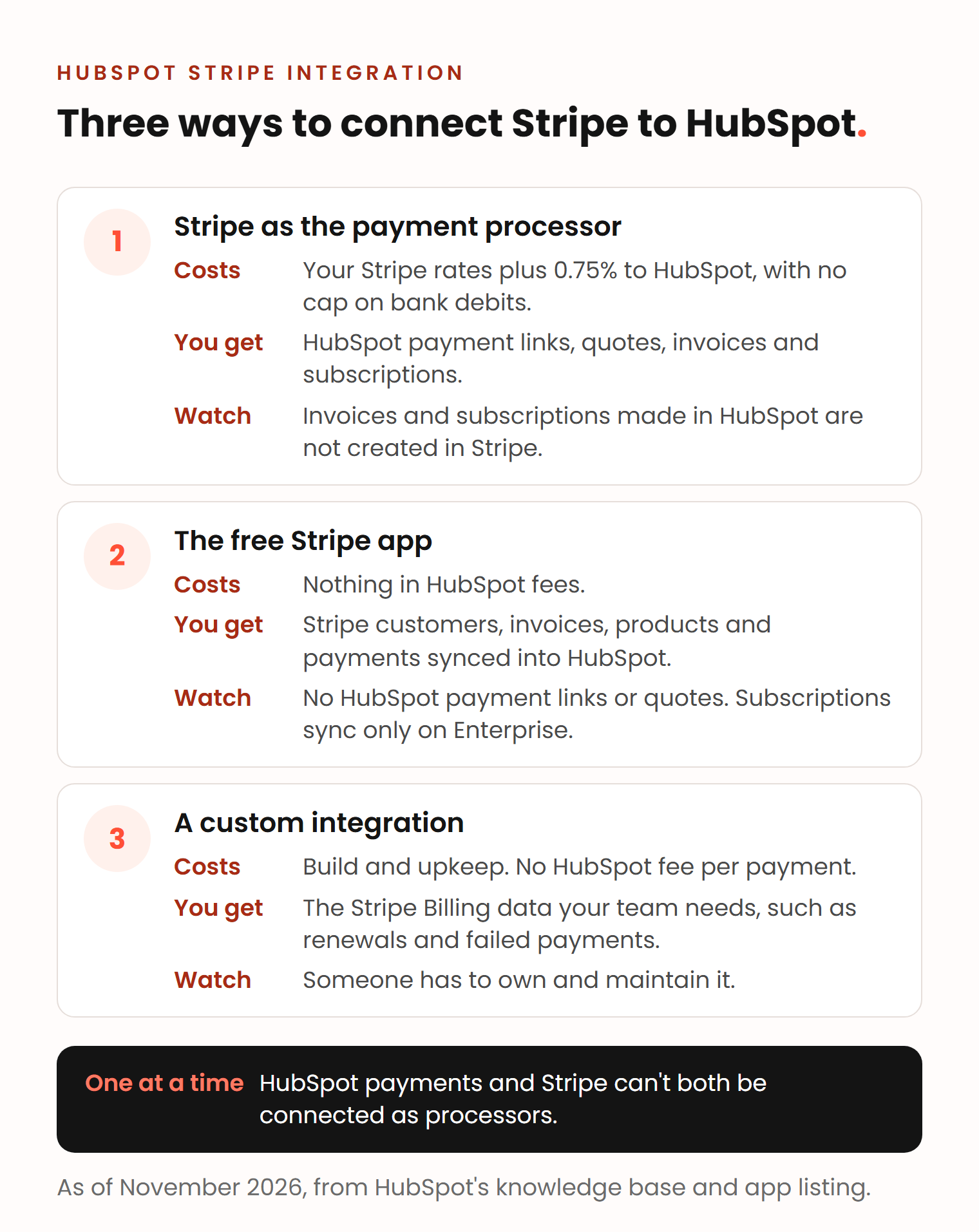
There are three ways, and they differ in cost and in what your team can do from HubSpot. Ben described the first two.
1. Stripe as the payment processor in HubSpot
Stripe processes the payment behind HubSpot’s own tools. For the rep, it looks the same as HubSpot payments: payment links, quotes, invoices and subscriptions all work, and payment data such as the gross amount and fees syncs to your Stripe account (HubSpot). It costs your Stripe rates plus HubSpot’s 0.75%. Two limits from the same page:
- Invoices and subscriptions created in HubSpot are not created in Stripe. If your finance team works in Stripe Billing, they will not see them there.
- Each HubSpot account connects to one Stripe account, and all brands in HubSpot share it.
2. The free Stripe app
Ben’s second option:
You can also just connect your Stripe to HubSpot. That is free, just connecting it as an outside app. Then you can at least still get information from your payments into HubSpot. But that way you wouldn’t be able to use payment links and things like that, automated in the way HubSpot makes it, where it’s really easy to use them.
Benjamin Wallmann, partner at Deeps Solutions
The app is built by HubSpot, costs nothing and needs a Stripe account. It syncs Stripe customers to contacts, plus invoices, products and payment transactions. Subscriptions sync only on Enterprise, as custom objects (HubSpot App Marketplace). As of November 2026, the listing shows a rating of 2.1 out of 5 from 91 ratings, and reviewers mention that subscription details and tax data do not sync.
Use it when you bill in Stripe and HubSpot only needs to show who paid. Your team then sends Stripe’s own payment links, by email or in forms.
3. A custom integration
When Stripe Billing runs your subscriptions and sales needs renewals, plan changes or failed payments in HubSpot, the free app is often not enough. A custom integration through both APIs syncs exactly the data you choose. It costs build time and an owner to maintain it, but no HubSpot fee per payment.
What are the downsides of Stripe and of HubSpot payments?
Stripe’s main downsides are possible fund holds, dispute fees and, inside HubSpot, an extra platform fee. HubSpot payments is limited to three countries and is hard to leave if you bill subscriptions in HubSpot.
Stripe
- Stripe can hold part of your funds for a set period as a reserve. The size depends on risk factors such as your dispute and refund rates (Stripe support). This is the cash flow risk Vlad warned about.
- Each card dispute costs $15 in the US, £20 in the UK and €20 in Germany at standard rates (US, UK, Germany).
- Inside HubSpot, you pay 0.75% on top, with no cap on bank debits.
HubSpot payments
- It does not remove the risk of a hold. As your payment provider, HubSpot checks your business’s credit risk, and its payments risk team can hold payouts (HubSpot payments FAQ).
- Leaving is harder than joining. HubSpot has a migration path from Stripe to HubSpot payments, with checkout switched off while it runs (HubSpot). In the other direction, subscriptions managed in HubSpot are canceled and must be created again (HubSpot).
In its favor, HubSpot payments includes fraud protection and chargeback support at no extra cost (HubSpot), and payouts usually reach your bank within two to four days (HubSpot payments FAQ).
How we set up payments in HubSpot
Every project starts with an analysis of how your team sells, including how customers pay: by card, by bank transfer, or by subscription. The processor follows from that, and so does the HubSpot plan you need.
When another system already takes the payments, we connect it rather than replace it. For Postal Packaging, orders and payments stay in Shopify. Reps build a phone order in a card inside HubSpot, and Shopify emails the customer a payment link (case study).
Stripe connections are part of our Integrations service, from €800 per integration. Automations around payments fall under Workflow Automation. For the rest of the sales setup, see HubSpot for sales teams.
Frequently asked questions
Is HubSpot payments available in Europe?
Only in the UK, as of November 2026. Companies based in the EU or Norway can connect Stripe as the payment processor in HubSpot instead, with a 0.75% HubSpot platform fee on top of Stripe’s rates. Croatia, Gibraltar and Liechtenstein are excluded from that option too.
Can you use HubSpot payments and Stripe at the same time?
Not as payment processors. HubSpot lets you connect either HubSpot payments or one Stripe account. Moving from Stripe to HubSpot payments has a migration path, while moving back cancels the subscriptions managed in HubSpot.
How much does HubSpot payments cost?
There is no monthly fee for payment links, invoices or subscriptions. Each card payment costs 2.9% in the US and Canada, or 1.7% for UK cards in the UK, plus a 0.5% platform fee that HubSpot waives for the first year for eligible customers. International cards and currency conversion cost extra. These are the rates as of November 2026.
Is there a better payment system than Stripe?
For payments collected inside HubSpot, there are only two options: HubSpot payments and Stripe, and HubSpot payments runs on Stripe’s infrastructure. You can use another processor alongside HubSpot, but HubSpot’s payment links, quotes and invoices cannot collect through it. You would sync its data with an app or a custom integration.