

For a B2B company of 50 to 500 people, the HubSpot vs Salesforce choice comes down to how defined your process is: HubSpot fits when it is still taking shape and a small team will run one system for sales, marketing and service. Salesforce fits when processes are defined and complex, with permissions in several layers, teams in several countries, formal approvals and people to build and maintain the system. As of November 2026, HubSpot Sales Hub Professional starts at $90 per seat per month, against $100 for Salesforce Pro Suite and $195 for Salesforce Core.
We are a HubSpot Gold Solutions Partner, so keep that in mind as you read. Most of the judgement below comes from Robin Dijst, a HubSpot freelancer from the Netherlands who worked for years as a Salesforce admin and developer before he moved to HubSpot. Vladislav German, founder of Deeps Solutions, and Benjamin Wallmann, partner at Deeps Solutions, talked the question through with him in a recorded conversation in October 2026.
Key takeaways
- HubSpot works out of the box and suits teams whose process is still forming, or who want marketing, sales and service in one platform.
- Salesforce is a platform you build on, and it suits companies with defined, complex processes: layered permissions, several countries and formal approvals.
- How your team sells can matter more than company size, and a calling-heavy team needs a power dialer, which HubSpot offers only in Sales Hub Enterprise.
- The licence is the visible cost, while admin time, implementation, integrations and AI usage decide the total on both platforms.
- You can run both, because HubSpot’s native Salesforce integration keeps contacts, companies and deals in sync in both directions.
What is the main difference between HubSpot and Salesforce?
HubSpot is a ready-made system: you get access, load your contacts and start. Salesforce is a platform you design and build. That difference explains most of the rest: cost, admin effort and who each one suits.
What convinced Robin to move was the users. In his Salesforce projects he had watched users drift away from the system. In HubSpot, people were excited to find playbooks that made their calls easier and sequences they could start themselves. His conclusion was that HubSpot is built for the user, rather than the user having to figure out how the tool can support them. He describes Salesforce like this:
Salesforce is like a database. You can load anything in, but there’s nothing there for you. You need to build it, which also helps you a ton in making your own process and your own business.
Robin Dijst, HubSpot freelancer at Pack of Nodes and former Salesforce admin
HubSpot sells one CRM with free tools and separate hubs on top for marketing, sales, service, content, data and revenue, all on the same database (HubSpot, as of November 2026). Ben adds that HubSpot now reaches well beyond CRM, from code that runs inside HubSpot apps to screen recording and video editing. In his view, it wants to cover nearly every tool a sales-led company uses.
HubSpot vs Salesforce: which one fits your team?
It depends on how defined your process is and who will run the system. Robin adds one point first: the tool rarely causes the failure. In his experience, most CRM projects fail on process and adoption, so neither choice is a bad decision by itself. He then checks four things: who will use the system and for what, how complex your data model is, how many systems you need to connect, and who will run it after go-live. If an admin team runs many systems in-house, pick a system that can integrate everything. If not, pick one that already has everything.
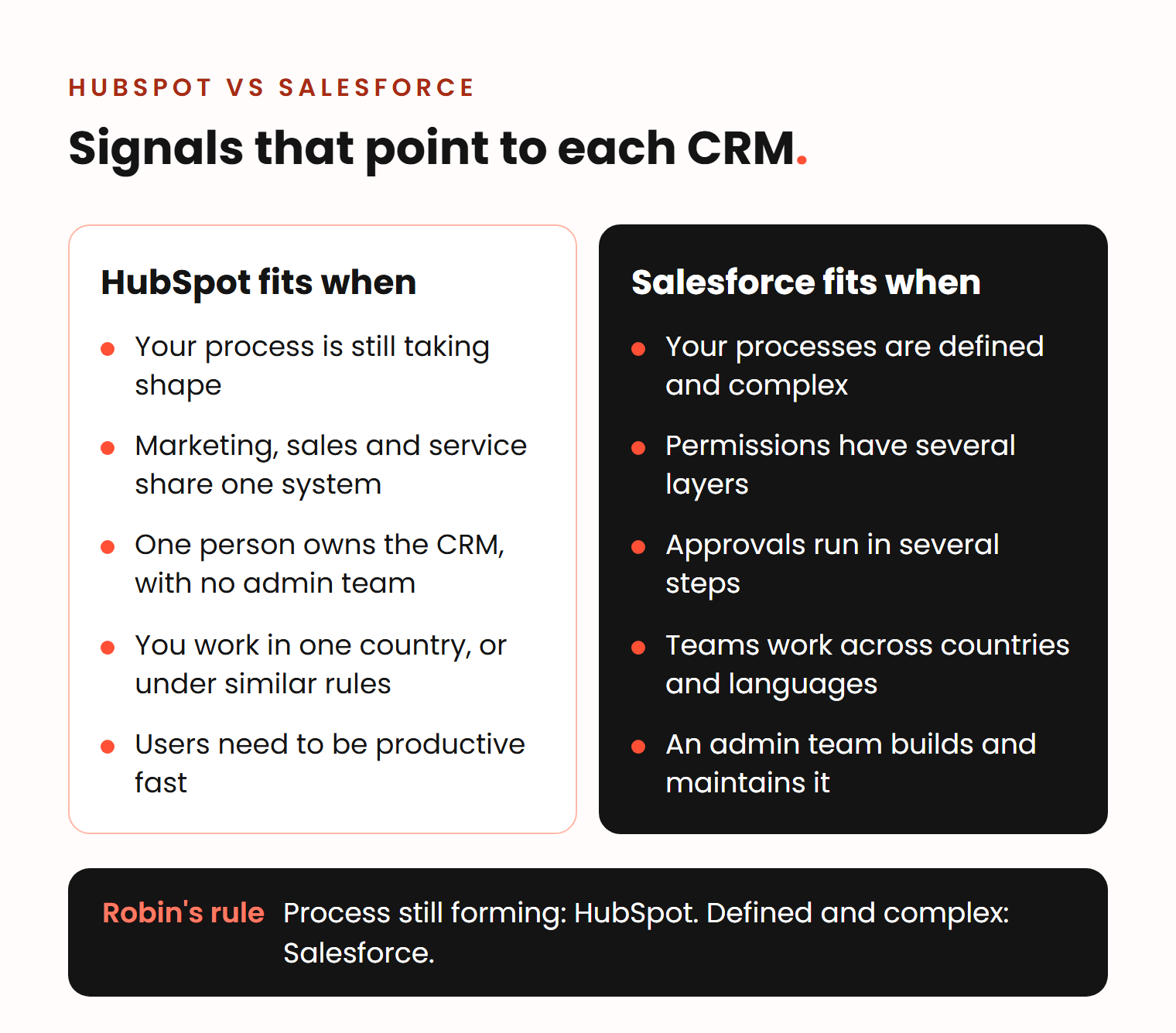
Signs that HubSpot fits
- Your sales process is not fully defined yet, or it changes as you grow.
- You want marketing, sales and service in one system with one data model.
- You have no admin team, only one person who owns the CRM next to other work.
- Your teams work in one country, or in a few countries with similar rules.
- Your users need to be productive quickly, without weeks of training.
Signs that Salesforce fits
- Your processes are defined, documented and complex.
- You need permissions in several layers: who can see and edit what, by team, country and deal stage.
- You run approvals in several steps, for example on discounts or contracts.
- You operate in several countries, maybe in several languages, inside one system.
- You have, or will hire, people to build and maintain the system.
Permissions show the gap most clearly. HubSpot Enterprise lets you limit who can view or edit specific properties, but HubSpot’s own help article says the feature does not give complete restricted access and should not be used as a security measure. Salesforce controls access at four levels, the whole org, objects, fields and single records, with tools such as role hierarchies and sharing rules (Salesforce Trailhead). HubSpot has added deal approvals in Sales Hub Enterprise, which covers a simple approval stage in the pipeline.
Robin put his rule into one if-then:
If you do not yet have every process within your company defined, and you don’t need multi-layer complexity, like you’re not a multinational, then I would say HubSpot will probably be sufficient most of the time. If you do have your processes and you find that these are complex, for example with multiple approvals, multi-country and maybe multi-language, then I would say go look at Salesforce.
Robin Dijst, HubSpot freelancer at Pack of Nodes and former Salesforce admin
His reason for the second case: with a settled, complex process, the system should become part of your business, and your business should not have to adapt to the system. If you lean towards HubSpot, the next question is the plan. Our answer on Professional or Enterprise lists the features that usually decide it.
Does the way you sell change the answer?
Yes. How your team sells can matter more than company size. Vlad added this point when we discussed it:
I think one more important thing is how you sell. Not every CRM fits this process.
Vladislav German, founder of Deeps Solutions
His example was a company that wanted to move from Close to HubSpot. During the project, we learned that their team sold mainly by phone. Close is built for that, with a power dialer that calls the next contact as soon as the previous call ends. HubSpot now has a sales power dialer too, but only in Sales Hub Enterprise (as of November 2026).
The same logic applies to Salesforce vs HubSpot. A team that sells to a few large accounts, in long cycles with many people involved, needs a different setup from a team that books demos at volume. Write down how your team sells before you compare features. Our guide on how to choose a CRM has the full list of questions.
How much do HubSpot and Salesforce cost?
As of November 2026, HubSpot Sales Hub starts at $90 per seat per month for Professional and $150 for Enterprise. Salesforce Sales Cloud costs $100 per user per month for Pro Suite and $195 to $550 for Core, Advanced and Max. These are the US list prices:
| HubSpot Sales Hub | Salesforce Sales Cloud | |
|---|---|---|
| Mid tier | Professional: from $90 per seat per month, plus a one-time $1,500 onboarding fee | Pro Suite: $100. Core: $195 per user per month |
| Top tiers | Enterprise: from $150 per seat per month, plus a one-time $3,500 onboarding fee | Advanced: $395. Max: $550 per user per month |
| AI included | 3,000 HubSpot Credits a month in Professional, 5,000 in Enterprise | An allowance of Flex Credits in Core, Advanced and Max |
| AI on top | Extra credits at $0.01 each | Flex Credits at $500 per 100,000, or Agentforce add-ons from $125 per user per month |
Sources: HubSpot pricing, Salesforce pricing and Agentforce pricing. Salesforce bills these editions annually.
The gap is smaller than the list suggests. Salesforce launched Core, Advanced and Max in September 2026 and bundles Slack, analytics and a Premier Success support plan into them (Salesforce). HubSpot, for its part, gives free view-only seats to people who only read records and reports (HubSpot).
Three costs do not appear on either price list:
- Admin time. Salesforce needs someone to build and maintain it. HubSpot needs less, but it still needs one owner.
- Implementation. Pipelines, permissions, integrations and data migration built around your process. For a HubSpot implementation with us, plan from €5,000, or from €8,000 for a sales team of 10 (what changes the price).
- AI usage. Both vendors charge for AI by use. Robin likes how well HubSpot’s AI handles everyday tasks, but he worries about the bill: when you pay for how you use AI, cost grows with the team and is hard to plan. Ask both vendors for an estimate based on your expected usage.
Robin’s warning on total cost:
If you don’t have someone that can manage it, it can be a cheap CRM to start using. But if you don’t have someone that can make use of it, then it’s still a very expensive line item.
Robin Dijst, HubSpot freelancer at Pack of Nodes and former Salesforce admin
Both vendors publish cost and speed claims, and both come from their own customers. HubSpot says 71% of 232 customers who switched from Salesforce report a lower total cost of ownership (HubSpot). Salesforce says small businesses implement Salesforce in 17 days on average, against 36 days for HubSpot Sales Hub (Salesforce). Neither number tells you what your company will pay. In our projects, a HubSpot rollout with clean data and trained users takes 5 to 8 weeks.
How do the app marketplaces and AI compare?
Salesforce has the larger ecosystem. Its AppExchange has more than 9,000 partner apps and expert listings (Salesforce, February 2026). HubSpot’s marketplace lists about 2,500 apps, agents and workflow templates (HubSpot, November 2026). Before you decide, check that the specific tools you depend on, such as your ERP, have a maintained connector.
HubSpot’s AI layer is Breeze, and Salesforce’s is Agentforce. Robin sees Breeze as a good fit for operational tasks inside HubSpot, such as reading incoming invoices and creating records from them. For deep account research, he would use other tools, where you have more control over the sources and the output.
Can HubSpot and Salesforce work together?
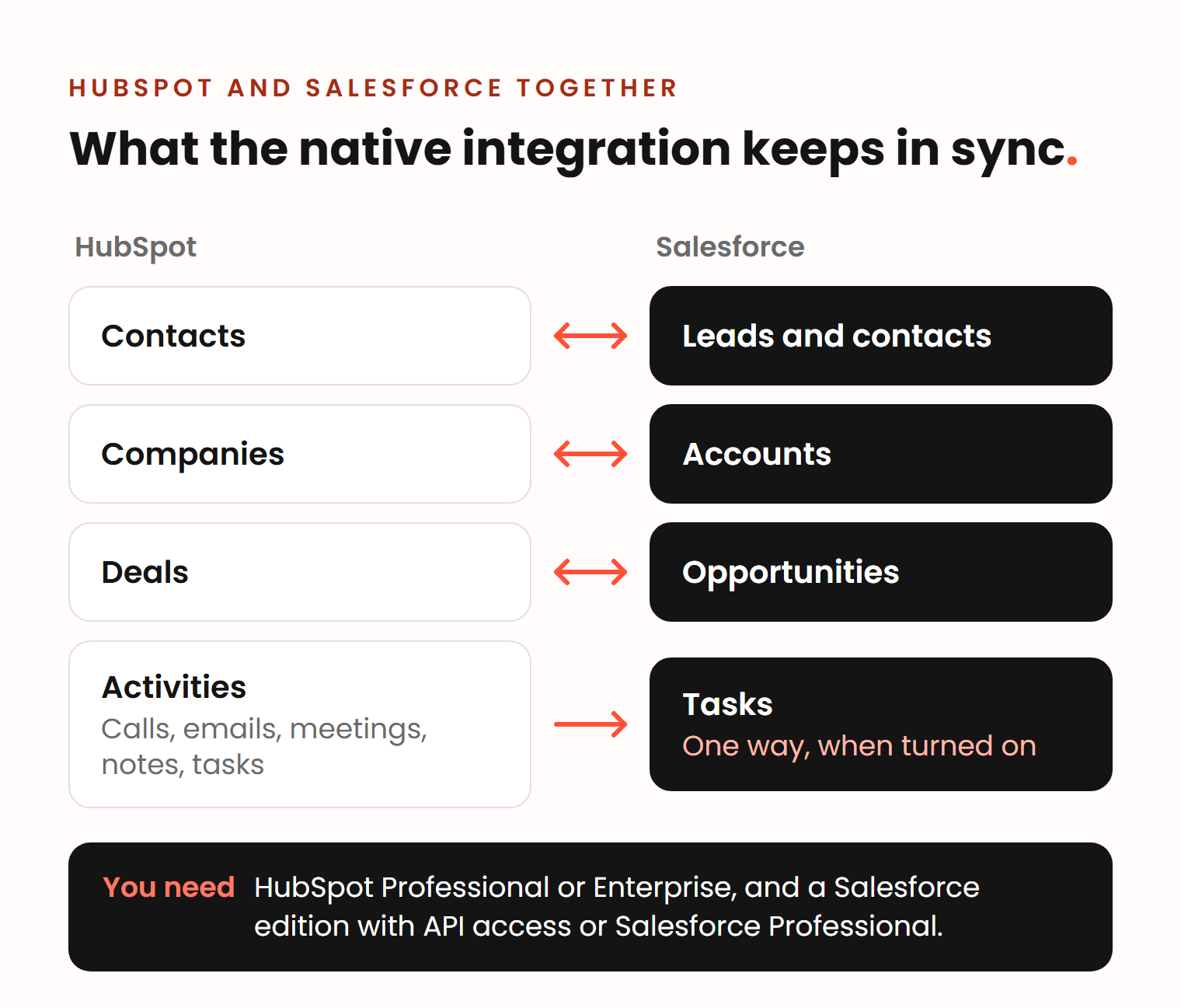
Yes. HubSpot has a native Salesforce integration designed for ongoing, two-way sync (HubSpot). It needs a HubSpot Professional or Enterprise subscription and a Salesforce edition with API access, or Salesforce Professional. Contacts, companies and deals sync with Salesforce leads, contacts, accounts and opportunities, and HubSpot activities can sync to Salesforce as tasks (HubSpot).
Some companies use this to run marketing in HubSpot and sales in Salesforce. It works, but it means two sets of licences and two systems to maintain. The sync also uses your Salesforce API calls, and you set how many of them HubSpot may use (HubSpot). Give one person the job of watching sync errors.
How we approach the choice
We build and fix HubSpot for B2B companies of 50 to 500 people. Every project starts with an analysis of how your team sells: stages, handoffs, permissions, integrations and the reports leadership needs. If that analysis points to Salesforce, we tell you.
If HubSpot fits, our Moving to HubSpot page explains what the switch involves. We have moved teams from spreadsheets, Pipedrive and Close. A HubSpot implementation usually takes 5 to 8 weeks, and you get a quote after an intro call.
Frequently asked questions
Is HubSpot better than Salesforce?
Neither is better for every company. HubSpot is usually the better choice for mid-market teams that want one system that is quick to start and easy to run. Salesforce is usually better for companies with defined, complex processes, permissions in several layers and an admin team. Whether you pick HubSpot or Salesforce, decide by how your team sells and who will run the system.
Who is Salesforce's biggest competitor?
At the top of the market, Microsoft. In Gartner’s 2026 Magic Quadrant for CRM Sales Platforms, Salesforce and Microsoft are the two Leaders, while Oracle, Zoho, HubSpot and Pega are Challengers (CX Today). HubSpot moved up from Niche Player in the 2025 edition, which was then called Sales Force Automation Platforms.
What is the #1 CRM in the world?
By revenue, Salesforce. IDC ranked it the number one CRM provider for the 13th year in a row, with a 20.0% share of the CRM market in 2025 (Salesforce). Market share shows size, not whether it fits your team.
What is the difference between HubSpot and HubSpot Sales Hub?
HubSpot is the platform: a CRM database with free tools that all its products share. Sales Hub is the paid product for sales teams on top of it, with tools such as sequences, playbooks and forecasting in its Professional and Enterprise plans. Marketing Hub, Service Hub and the other hubs work on the same CRM data.