


The short answer to how to use AI in sales: give AI the work around the conversation and keep the conversation for yourself. Seven workflows cover most of a rep’s week, from a 10-minute brief before the call to a weekly review that asks why a task slipped. Each one saves time only when a person checks the output before it reaches a client.
After an intro call, Vladislav German, founder of Deeps Solutions, used to spend hours working out a proposal. Today a Claude skill drafts it from the call transcript, and a simple proposal takes 5 to 10 minutes. That time matters: in Salesforce’s State of Sales survey of 4,050 sales professionals, reps said they spend 60% of their working week on tasks that are not selling.
The workflows below come from recorded conversations between Vlad, Benjamin Wallmann, partner at Deeps Solutions, and HubSpot freelancer Robin Dijst.
Key takeaways
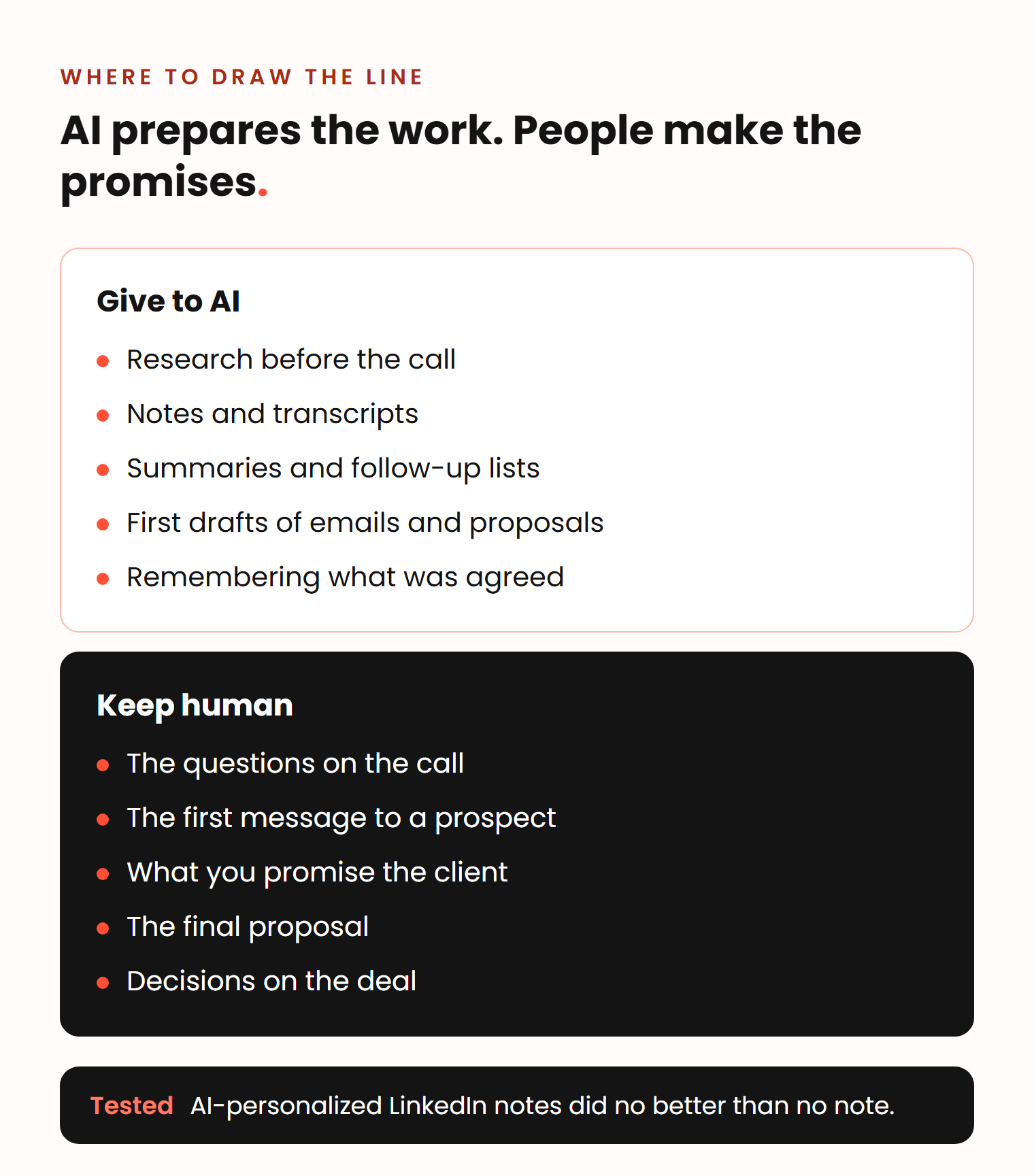
- Use AI for research, notes, summaries and first drafts, and keep the questions, the promises and the final word human.
- Ask your discovery questions so the client says the answers out loud, because the transcript feeds every step after the call.
- A proposal skill built from one manual run in a chat can cut a simple proposal from hours to 5 to 10 minutes.
- In Vlad and Ben’s test, AI-personalized LinkedIn notes did no better than no note at all.
Where does AI fit in a sales rep’s week?
AI fits in five places: before the call, on the call, after the call, between calls and in the weekly review. The conversation with the buyer stays human. Many teams have already started: in the same Salesforce survey, 54% of sales teams said they use AI agents today, and another 34% expect to within two years.
Robin describes what is left for the rep:
Doing extensive research is now just a prompt and you can do something else. Writing an email is now just a prompt and you can do something else. The only thing you need to do is read the drafts, read the report, and build your opinion around it or make changes where necessary.
Robin Dijst, HubSpot freelancer, Pack of Nodes
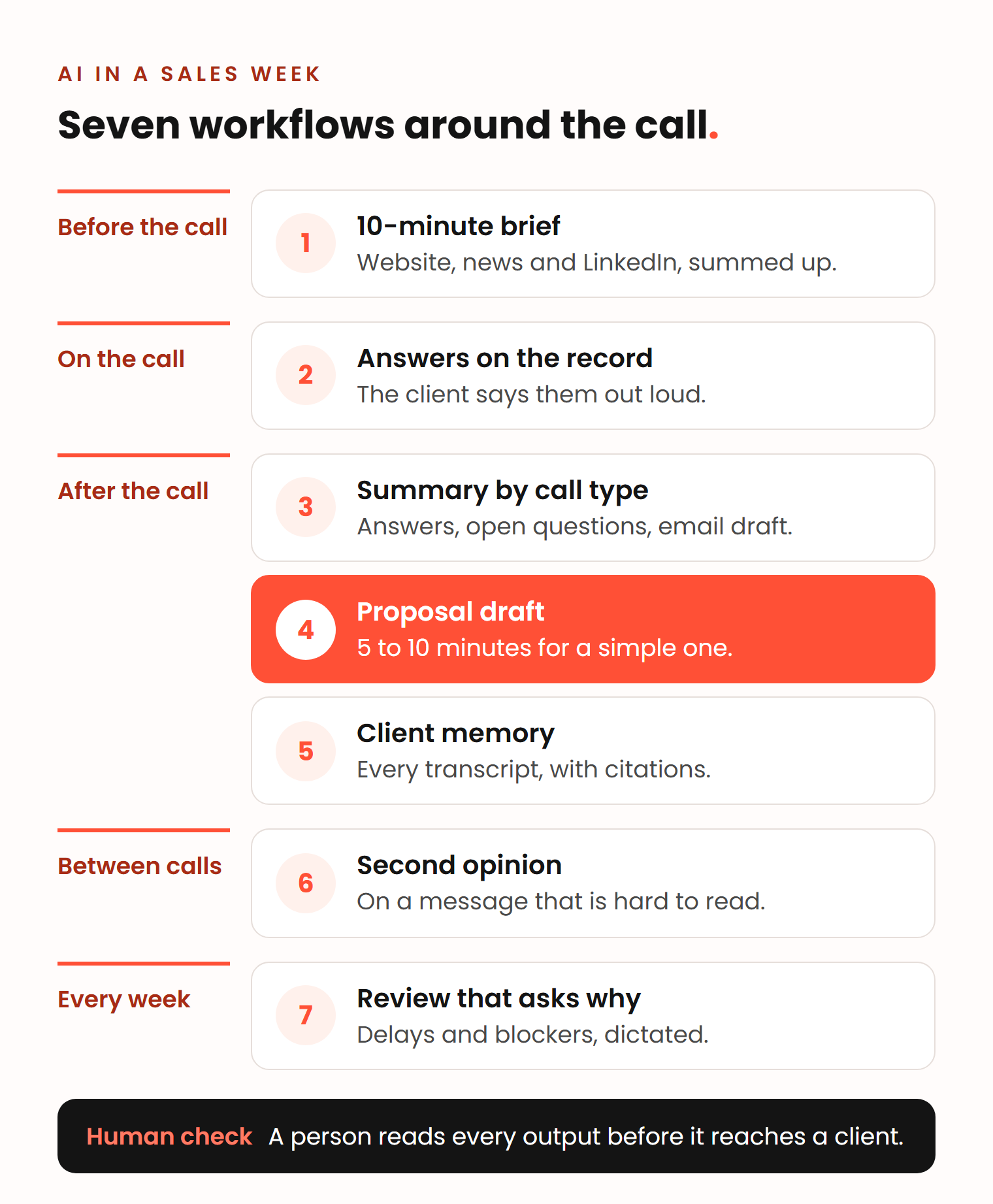
How to use AI in sales: 7 workflows from call prep to weekly review
Most advice on AI for sales reps stops at a list of tools. These are routines Vlad, Ben and Robin actually run, each with its input, output, tool, time saved and human check.
1. A 10-minute brief before every call
Ben’s rule: a top performer preps for every call. The client is often talking to three to five vendors and does not want to explain the basics again.
- In: the company website, recent news, and the person’s LinkedIn posts from the last few weeks.
- Out: a short company summary, a first guess at its problems, and questions you no longer need to ask.
- Tool: Claude or ChatGPT. For a complex deal, Robin sets up a research agent a day or a few hours before the meeting.
- Time: 5 to 10 minutes of prep, and no call time spent asking what the company does or how big it is.
- Human check: open the website and the profile yourself. Use the summary to shape questions, not as facts to repeat.
2. Questions that land in the transcript
On the call, the AI note taker writes, so you can listen. Vlad keeps a fixed list of questions that covers everything he needs for a proposal, and makes sure the client says the answers out loud, even when he already knows them. Goals, pain points and timeline then sit in the transcript for every later step. Our sales discovery questions are a good starting list.
- In: your question list and a recorded call.
- Out: a transcript that holds the answers you need.
- Tool: an AI note taker or the call recording in your CRM.
- Time: no typing during the call, and no email afterwards asking for details you forgot.
- Human check: write down ideas you do not say out loud. The note taker cannot hear them.
3. A call summary by call type
Do not settle for the note taker’s generic summary. Ben gives the AI a fixed list for each call type: what it must pull out of the transcript, and what you must confirm back to the client.
- In: the transcript and the call type.
- Out: the answers to your list, the open questions and a draft follow-up email.
- Tool: Claude or ChatGPT with saved instructions for each call type.
- Time: the summary and follow-up list are ready right after the call.
- Human check: read the draft email and remove anything the client did not actually say.
4. A proposal draft from the transcript
Vlad calls this the number one use case for sales teams right now. His Claude skill takes the intro call transcript, finds the answers to his qualification questions, asks him to confirm the timeline and the budget, and returns a draft proposal.
What used to take you hours after a call, when you need to think and amend, can take you now five, ten minutes to prepare this proposal, especially if it’s a simpler one.
Vladislav German, founder of Deeps Solutions
You can build the skill without code: do the job once in a chat with a transcript, an example proposal and your question list, then ask Claude to turn it into a skill. Anthropic’s tutorial on creating a skill through conversation describes the same path (as of November 2026).
- In: the transcript, an example proposal and your question list.
- Out: a first draft in your own format.
- Tool: a Claude skill.
- Time: Ben estimates half an hour saved on a small proposal and two hours or more on a big one.
- Human check: read and iterate, because Claude does not know everything you are thinking. The full process is in how to write a sales proposal with AI.
5. A memory of every client conversation
The Deeps team keeps one knowledge base per client in Claude, with the transcript of every meeting. A skill compares each new transcript with the earlier ones. When a client says something different from the last meeting, it asks whether that was a mistake or a change of mind.
- In: all meeting transcripts for one client.
- Out: answers such as why the team chose one option two meetings ago, with a citation to the transcript.
- Tool: Claude, with one knowledge base per client.
- Time: one question instead of re-reading old notes.
- Human check: open the citation. Decisions made by WhatsApp or email are not in the transcripts, so record them too.
6. A second opinion on a difficult message
When a client relationship gets tense, you read their messages through your own emotions. During a miscommunication with a client, Vlad pasted the message and a few earlier ones into ChatGPT and asked what was going on. The answer: the client cared about trust. Vlad had assumed the problem was something the team had not done, which the client had never mentioned.
- In: the message and a few messages of history.
- Out: what the other person seems to care about, separated from your assumptions.
- Tool: ChatGPT or Claude.
- Time: a few minutes before you reply.
- Human check: you write the reply. The AI only sees what you paste.
7. A weekly review that asks why
The whole Deeps team runs its daily and weekly reviews through AI. The AI asks follow-up questions: why was this delayed, and was there a blocker? If Ben moves the same client task two days in a row, it notices and asks why.
- In: what you planned and what you did, dictated rather than typed.
- Out: follow-up questions, then a short summary of delays and blockers.
- Tool: an AI assistant plus a dictation app such as Wispr Flow, which Ben uses.
- Time: the team could do it by hand, but Ben says AI makes it much faster.
- Human check: answer the questions honestly. The value is in the thinking they force.
Vlad uses dictation mostly for prompts. When you type, you cut corners. When you speak, you give the AI the full context.
Where does AI make sales worse?
AI makes sales worse when it replaces what buyers judge you on: the first message, the promise and the person behind it. Three patterns stand out.
Generic personalization. Vlad and Ben built an AI process that read each prospect’s LinkedIn profile and wrote a personal connection note, polished until Vlad felt he would write like that himself. Then they tested it: half the requests went out with the note, half without, and they switched groups so the sender did not skew the result. There was no difference in acceptance. In some groups, no note may even have done better.
Ben’s explanation: the AI picks one small detail from a profile and builds the whole message around it, which produces lines like “Oh, I really love your work on the intersection of data and privacy.” Its guesses at the prospect’s biggest problem almost never fit. Buyers notice: in a Gartner survey of 632 B2B buyers, 73% said they actively avoid suppliers who send irrelevant outreach.
Ben’s alternative: use AI to find the right person and the right moment, and keep personalization to name and industry. One example per target industry is a simple if-condition, no AI needed.
Recordings nobody reads. Vlad’s warning: if you record every call but nobody reviews the transcripts and gives reps feedback, you waste time and money. The workflows above work because every transcript feeds a next step.
A bot where the buyer wants a person. The same Gartner survey found that 61% of B2B buyers prefer a rep-free buying experience overall. But they still want a seller for questions that need context, such as whether a product fits their company. Ben names what buyers expect from that person:
I want someone to be responsible for what they tell me. I want to know this salesperson told me this and if something happens, I can tell them, hey, this salesperson told me this.
Benjamin Wallmann, partner at Deeps Solutions
AI can make messages look human, but buyers spot it quickly when it goes wrong, so Ben keeps the most human work in customer communication.
What does AI in sales need to work?
AI needs a defined process and clean data. Without them, it speeds up the mess. Vlad’s rule is that automation comes only on top of an established process. If the process is chaos, you automate the chaos and lose control.
In the Salesforce survey, 46% of sales professionals with AI agents said data quality issues hurt their sales. Robin expects AI to replace the CRM as the screen you work in, but not as the place where structured data lives. We look at that shift in will AI replace the CRM?
To choose where to start, use Vlad’s filter: what you do most often, what takes most of your time and what is most repetitive. Automate one routine, then add the next, as with any sales process automation.
How Deeps helps sales teams use AI
We are a HubSpot Gold Solutions Partner, so most of our AI work happens inside the CRM. We set up HubSpot’s AI features on clean data and build custom AI automations where the built-in ones stop, as described on making HubSpot smarter with AI. When the process needs work first, we start with sales process consultancy and map how your team sells before any tool or AI touches it.
Frequently asked questions
Should I use ChatGPT or Claude for sales?
Both handle the seven workflows in this article. Vlad builds proposals with a Claude skill and used ChatGPT to read a difficult client message. Pick the tool your company approves for client data and your team will open every day. The habit matters more than the tool.
What is an AI sales assistant?
An AI sales assistant is software that takes routine work off a rep: research, call notes, summaries, email drafts and reminders. It can be a general chat assistant, an AI note taker or the AI built into your CRM. The rep still reads and approves everything it produces.
How do I start using AI in a sales team?
Pick one workflow that happens often, takes time and repeats, such as call summaries. Run it by hand in a chat a few times, then save it as instructions or a skill. Add the next workflow once the first one runs without surprises.
Can I put client call transcripts into AI tools?
Tell clients that you record the call, and follow the recording rules that apply in your country. Use a company account with terms your IT and legal team approved, not a private one. Keep transcripts separate per client so details do not mix between accounts.