

Sales process automation means software runs the repeatable steps of your sales process: it routes new leads, logs calls and emails, creates follow-up tasks and turns won deals into orders. Automate a step when it happens often, takes real time, runs the same way every time and needs little judgement. Keep people on the steps where someone has to decide, build trust or stand behind a promise.
There is a lot of time to win. In Salesforce’s State of Sales report for 2026, based on a survey of 4,050 sales professionals, the average seller spends only 40% of their time selling. When we talked about how much of a rep’s day to automate, Vladislav German, founder of Deeps Solutions, started with a warning, not a tool.
If you don’t have an established, consistent process, and you have some sort of chaos in your process, you will automate your chaos. And then you will lose control of what’s going on.
Vladislav German, founder of Deeps Solutions
Key takeaways
- Automate a task when it happens often, takes real time, runs the same way every time and needs little judgement.
- Agree on the process before you automate it, or the automation copies the chaos.
- AI can prepare research, call notes and drafts, but a person decides and sends.
- For the buyer, the human touch means accountability: a named person who stands behind the promise.
What is sales process automation?
Sales process automation is software doing steps of your sales process that a person used to do by hand. Some of it is simple rules: when a form comes in, create a contact, assign an owner and create a task. Some of it now uses AI, which can read a call transcript, write a summary or draft an email.
Sales automation and sales process automation usually mean the same thing. Either way, you automate steps the team already follows.
The aim is not fewer salespeople. It is less work that has nothing to do with selling. Benjamin Wallmann, partner at Deeps Solutions, put it this way:
Everyone knows about salespeople that are fed up with all the forms they have to fill out. That doesn’t have anything to do with sales. It’s just so you have data for later. And now we can capture that data automatically.
Benjamin Wallmann, partner at Deeps Solutions
Why does the process have to come before automation?
Automation repeats whatever you give it, at speed. If two reps qualify leads in two different ways, a workflow locks in one of them, or a mix of both. If nobody agrees when a deal moves to “proposal sent”, a reminder tied to that stage fires at random times. Mistakes a person would notice once now repeat hundreds of times.
Vlad’s rule is to define the process first and think about the tool only after that. Start at the beginning. Which channels bring leads? What happens after a lead arrives? Talk it through with the sales team and find the gray areas: steps that people handle differently, or not at all. Ben maps it on a digital whiteboard, where steps are easy to move before anything is built. More in our guide on how to build a sales process.
How do you decide what to automate in sales?
Ask four questions about each task. The first three come from Vlad: what reps do most often, what takes most of their time, and what is most repetitive. The fourth is the limit he named: steps where someone has to think and decide are hard to automate.
- How often does it happen? Every day or in every deal, not once a quarter.
- How much time does it take? Small tasks add up. Five minutes per deal, for 20 reps with 30 deals each a month, is 50 hours a month.
- Does it run the same way every time? Same input, same steps, same result.
- How much judgement does it need? If someone has to decide, negotiate or promise, software can prepare the work, but a person should own it.
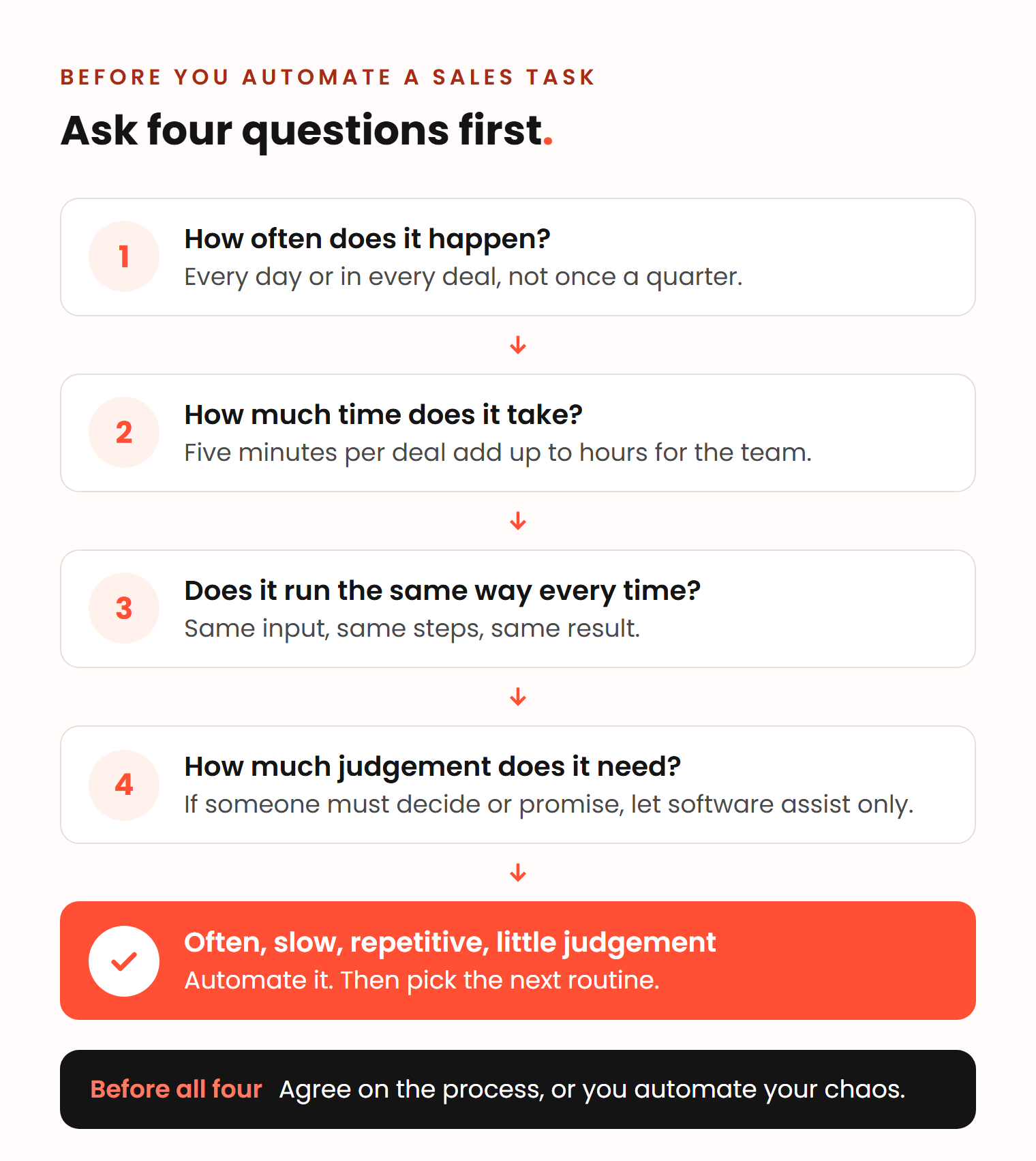
A task that scores high on the first three questions and low on the fourth is a good candidate. Vlad’s advice is to start with one routine, never everything at once.
Sales automation examples: what to automate, assist and keep human
Frequency and judgement sort most sales tasks into four groups. If a task needs a lot of judgement, a person owns it either way. Frequency decides whether it is worth building help around that person. Frequency here means how often the same situation repeats: every deal has a negotiation, but no two negotiations are the same.
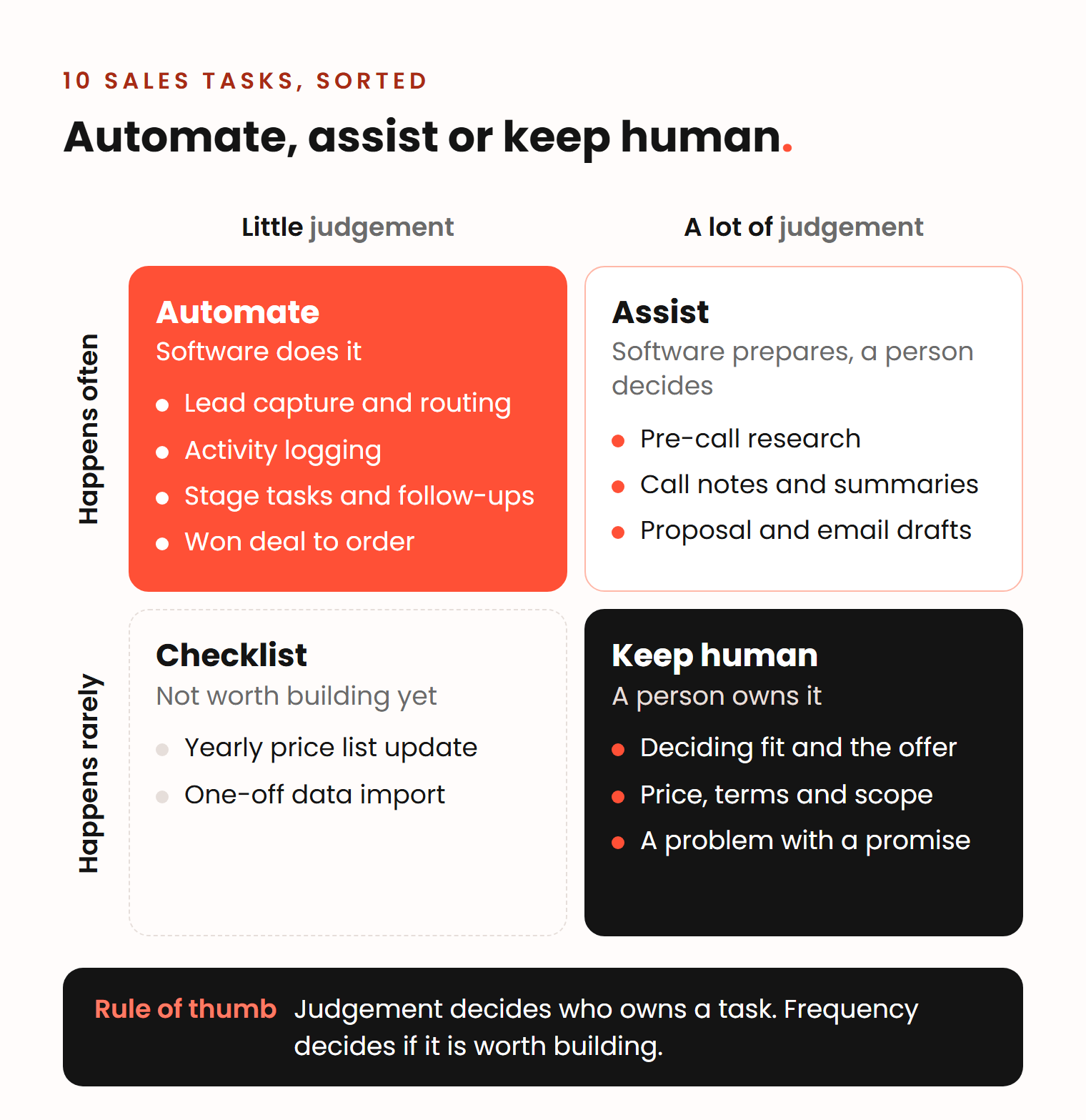
A rare task with no judgement, like a yearly price list update or a one-off data import, is usually cheaper as a checklist than as a workflow. Here are 10 common tasks in a B2B sales team, sorted into the other three groups.
Automate: the software does it
- Lead capture and routing. Every inquiry becomes a record with an owner and a task within minutes. A 2011 Harvard Business Review study found that firms that tried to contact a lead within an hour were nearly seven times as likely to qualify it as firms that waited even an hour longer. For a UK car finance broker, each inquiry now becomes a lead in HubSpot, assigned by round robin, and an automation creates the contact from finance application emails even when the website’s quote calculator times out.
- Activity logging. Emails, calls and meetings land on the right contact and deal without anyone copying them. This is the data behind Ben’s forms: managers need it, reps should not have to type it.
- Stage tasks, reminders and early follow-ups. When a deal enters a stage, the system creates the next task. Leads that go quiet get a short automated sequence. Vlad’s way to set its length: run about 10 automated touches, look at the data, and stop where the replies stop. Records with no activity for a set time can close on their own. More in our guide to sales follow-up.
- The handoff after a won deal. A won deal creates the order, invoice or onboarding project, with the products, prices and addresses from the deal. For Postal Packaging, won trade and print deals now become Shopify draft orders. Their old Zapier flow failed on 15 to 20% of deals. The order automation now works for nearly all of them.
Assist: software prepares, a person decides
- Pre-call research. AI can summarize the company, recent news and the buyer’s role in minutes. The rep reads it before the call. In Salesforce’s 2026 report, sellers expected AI agents to cut prospect research time by 34% and email drafting time by 36%.
- Call notes and summaries. An AI note taker writes the call summary, so the rep can listen instead of typing. The rep runs the call, checks the summary and decides what goes into the CRM.
- Proposal and email drafts. AI can draft a proposal or a follow-up email from the call transcript. A person reads it, fixes what the AI could not know, and sends it under their own name.
Keep human: a person owns it
- Deciding fit and what to offer. Whether this client is a fit, and which solution solves their problem, is a judgement call. Sometimes the right answer is a different package from the one the client asked for.
- Price, terms and scope changes. Discounts, payment terms and anything outside the standard offer change what you deliver. The person who agrees to them has to answer for them later.
- A problem with what was promised. When something goes wrong, the client wants the person who made the promise, not a ticket number.
What does the human touch mean in sales?
The human touch means two things. Ben split it into what the buyer experiences and who makes the decisions inside your team.
For the buyer, a person confirms that the company is real, answers questions that are not in any knowledge base, and is responsible for what was said.
I want reliable information and I want someone to be responsible for what they tell me. I want to know this salesperson told me this, and if something happens, I can tell them: hey, this salesperson told me this.
Benjamin Wallmann, partner at Deeps Solutions
That is accountability. A chatbot can sound friendly, but nobody can hold it to a promise. In a Gartner survey of 632 B2B buyers, published in 2025, 61% preferred a buying experience without a sales rep overall. But for tasks that need context, such as deciding whether a product fits their company’s needs, they preferred input from a seller. The same survey found that 73% of buyers actively avoid suppliers who send irrelevant outreach.
Ben also warned that AI makes it easy to look human and hard to do it well: buyers often see right away that an AI is talking. Automated messages that only pretend to be personal cost more than they save.
Inside the team, the question is which decisions a workflow or an AI may make. Ben’s view: automate a lot of them, but check the AI’s reasoning and correct it, the same way you coach a rep who made a bad call with a client.
What is left for the salesperson after automation?
The selling is left. If you could automate everything, Vlad pointed out, it would no longer be a sales process but self-service buying. That is possible for some products. In complex B2B sales, the rep keeps the part that needs a person. Robin Dijst, a HubSpot freelancer who works in the Pack of Nodes cooperative, described what that looks like today:
All the administrative tasks, they vanish. Doing extensive research is now just a prompt and you can do something else. Writing an email is now just a prompt and you can do something else. The only thing you need to do is read the drafts, read the report, and build your opinion around it or make changes where necessary.
Robin Dijst, HubSpot freelancer, Pack of Nodes
What remains is listening, asking good questions, advising and closing. That is the work reps were hired for.
How to start: one routine at a time
Start with one routine, check it, then add the next.
- Map the process with the sales team, from first inquiry to won deal.
- List the routines reps repeat every week, and roughly how long each one takes.
- Score them with the four questions. Pick the one with the most frequency and time, and the least judgement.
- Automate that one routine. Test it with real records and tell the team what changed.
- Check it after a few weeks. Did it save time? Is the data cleaner? Ben’s test: if people are frustrated with it, it is not bringing value, even when it works.
- Then pick the next routine.
Automate only what someone will use. Vlad’s example is call recording introduced for control, when nobody reviews the transcripts or gives the reps feedback. You pay for the tool and the effort, and get nothing back.
How Deeps approaches sales process automation
Every project starts with an analysis of how the team sells. We map the process with the sales team first, then build the automation in HubSpot, one routine at a time: lead routing, follow-up tasks, data capture and handoffs to other systems such as Shopify. When the process itself is unclear, we start with sales process consultancy.
Workflow automation starts from €1,000, and integrations from €800 per integration. You get a quote after an intro call.
Frequently asked questions
What is an example of sales automation?
Lead routing is a typical one. A new inquiry creates a contact, gets an owner and creates a task without anyone touching it. Other examples are automatic logging of calls and emails, follow-up reminders by deal stage, and turning a won deal into an order or invoice.
What should you not automate in sales?
Do not automate steps that need judgement or a promise: deciding whether a client is a fit, agreeing on price and terms, and handling a problem with what was promised. AI can prepare research, notes and drafts for these steps, but a person should decide and stay accountable.
Which steps of the sales process can you automate?
A common model has seven steps: prospecting, preparation, approach, presentation, handling objections, closing and follow-up (Lucid). Automation helps most at the edges: finding and routing prospects, preparing research, and follow-up. The steps in the middle, where you talk with the buyer, stay human.
Can AI automate the whole sales process?
For some products, yes, and then it becomes self-service buying. For complex B2B offers, AI can take over much of the admin, research and drafting. Buyers still want a person for advice on fit and someone who is accountable for the promise.